Pixi updaters
The two Pixi updaters maintain different pins:
| Command | Updates | Configuration (pixi.toml) |
|---|---|---|
pixi-version | pixi-version: values in setup-pixi workflows | Root [tool.pixi-version-updater] |
pixi-update | Dependencies recorded in each pixi.lock | Adjacent [tool.update] |
pixi-version
pixi-version resolves the latest prefix-dev/pixi release once per run, then rewrites pixi-version: vX.Y.Z in marked files directly under .github/workflows.
- uses: prefix-dev/setup-pixi@a09b6247153796b190642a2b53fac4241043cf6f # v0.10.0
  with:
    pixi-version: v0.70.0
Files must contain the configured setup-pixi marker.
The default marker is prefix-dev/setup-pixi.
Override it when workflows use a fork, for example:
- uses: octo-org/setup-pixi@<commit-sha>
  with:
    pixi-version: v0.70.0
quant-ranger update \
  --repository octo-org/octo-repo \
  pixi-version \
  --setup-pixi-marker octo-org/setup-pixi
The marker is a plain substring used to select workflow files.
The updater does not change the uses line.
It updates pixi-version values in matching files.
Its deployment-wide default is documented under Configuration.
# Resolve the latest Pixi release
quant-ranger update \
  --repository octo-org/octo-repo \
  pixi-version

# Request an exact release instead
quant-ranger update \
  --repository octo-org/octo-repo \
  pixi-version \
  --pixi-version v0.70.0
Any pixi.lock makes a repository eligible.
Repository settings are read from the root pixi.toml.
When the section is absent, the defaults below apply.
[tool.pixi-version-updater]
autoupdate-branch = "pixi-version-updates"
autoupdate-commit-message = "chore: Update Pixi version"
autoupdate-pull-request-labels = ["dependencies", "pixi"]
autoupdate-schedule = "monthly"
| Key | Default | Meaning |
|---|---|---|
autoupdate-branch | "pixi-version-autoupdate" | Managed branch |
autoupdate-commit-message | "chore: Update pixi version" | Commit message and pull-request title |
autoupdate-pull-request-labels | ["dependencies"] | Pull-request labels |
autoupdate-schedule | "monthly" | weekly, monthly, quarterly, or never |
An invalid root config is logged and the defaults are used.
pixi-update
pixi-update finds every pixi.lock with a pixi.toml beside it and runs a sandboxed command from the manifest directory:
The sandbox is a security boundary. Pixi may execute a project-defined build backend while resolving dependencies, and a malicious backend could otherwise run arbitrary code with the quant-ranger process's privileges and credentials.
pixi update \
  --no-progress \
  --json \
  --no-install \
  --manifest-path <absolute-path-to-pixi.toml>
When an ignore-environments or ignore-platforms list is configured, the command also receives -e or -p arguments for the remaining environments or platforms.
No environment is installed.
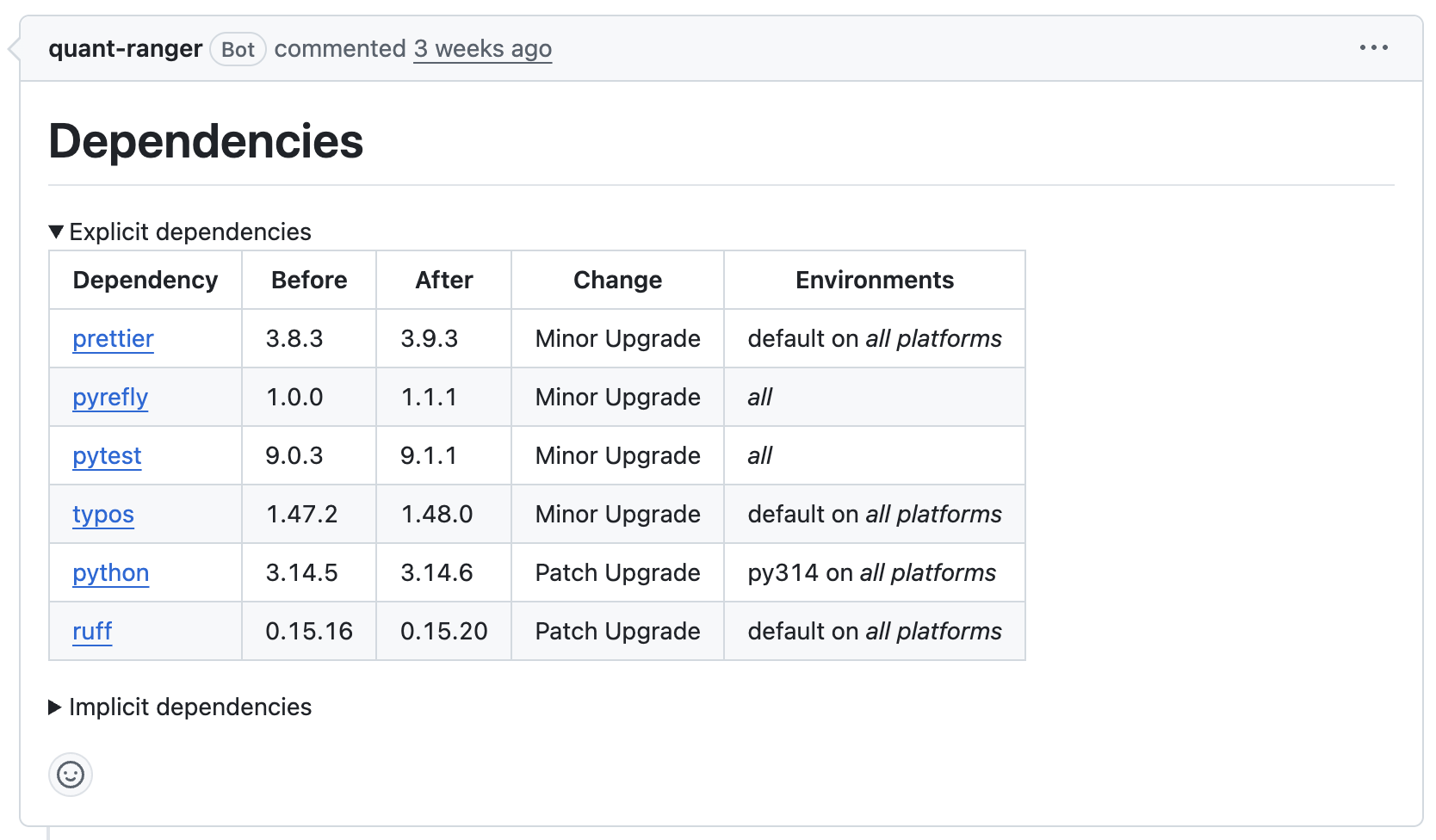
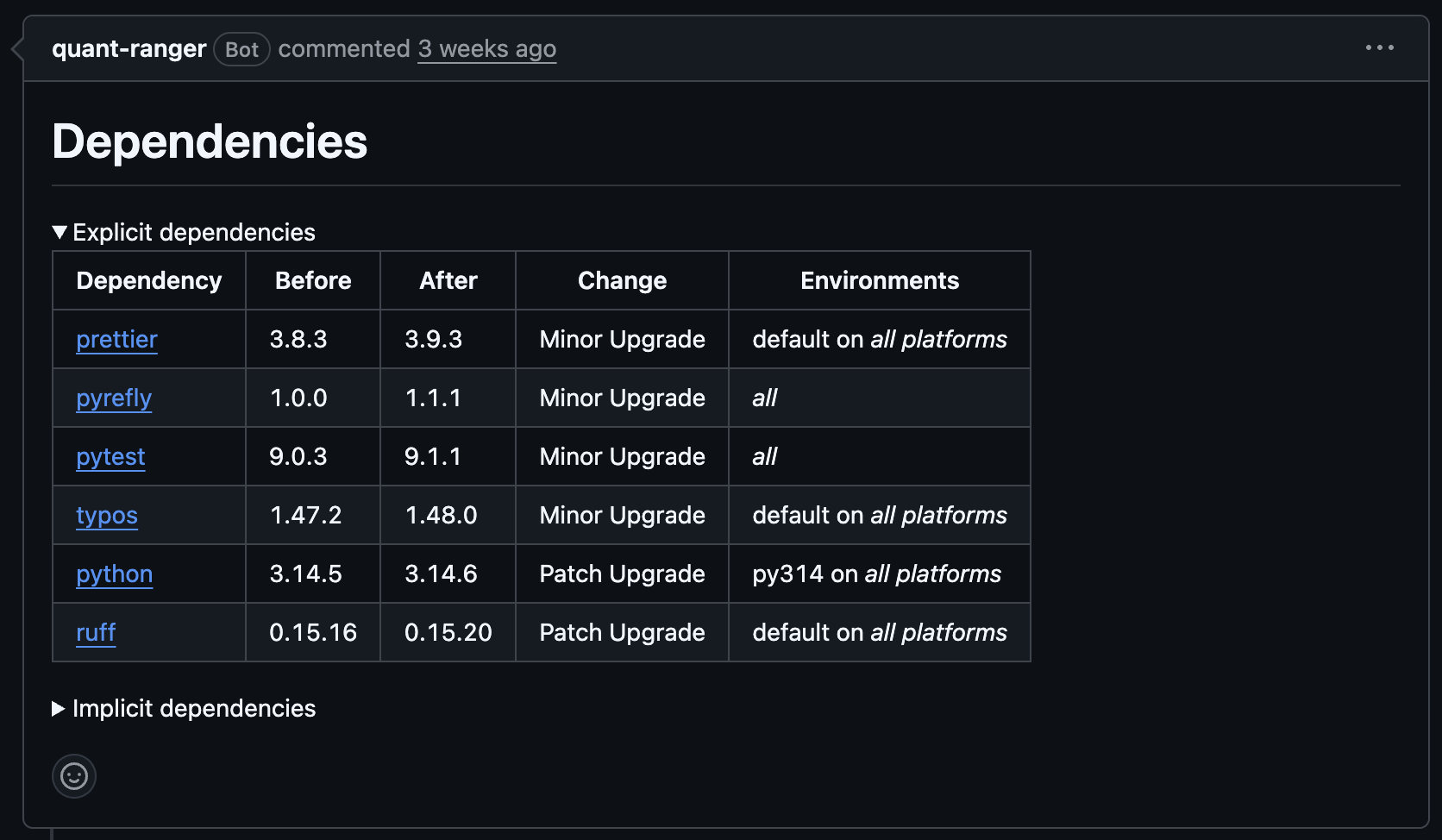
quant-ranger passes the JSON output to pixi-diff-to-markdown and uses the resulting dependency report as the pull-request body.
Multiple lockfiles produce separate update items and independently configured pull requests.
quant-ranger update \
  --repository octo-org/octo-repo \
  pixi-update
Example pull request
Configure each project in its own manifest:
[tool.update]
autoupdate-branch-prefix = "pixi-lock"
autoupdate-commit-message = "chore: Update Pixi lockfile"
autoupdate-pull-request-labels = ["dependencies", "pixi"]
autoupdate-schedule = "weekly"
ignore-environments = ["docs"]
ignore-platforms = ["win-64"]
| Key | Default | Meaning |
|---|---|---|
autoupdate-branch-prefix | "pixi-update" | Managed branch prefix |
autoupdate-commit-message | "chore: Update pixi lockfile" | Commit message and pull-request title |
autoupdate-pull-request-labels | ["dependencies"] | Pull-request labels |
autoupdate-schedule | "monthly" | weekly, monthly, quarterly, or never |
ignore-environments | [] | Environments excluded from dependency resolution |
ignore-platforms | [] | Platforms excluded from dependency resolution |
The branch ends in the manifest path, and the pull-request title includes the nested lockfile path. A missing or invalid adjacent manifest is skipped and logged.
The updater detects HTTP(S) channel hosts and forwards matching standard Pixi/rattler credentials into the sandbox.
On macOS Pixi stores its credentials on the system keychain; quant-ranger automatically reads them from there.
Otherwise, it reads the credentials file reported by pixi info or selected with RATTLER_AUTH_FILE.
Missing credentials produce a warning and the update continues.
The sandbox is supported on Linux and macOS. It permits network access and only the files needed by Pixi, including declared credential and configuration files.
pixi-update uses a rootless sandbox that needs unprivileged user namespaces.
Enable them before invoking pixi-update, or use a runner that already permits them.
sudo sysctl -w kernel.apparmor_restrict_unprivileged_userns=0
Schedule filtering
Scheduling only starts quant-ranger.
The --schedule filter is specific to pixi-version and pixi-update.
Both commands compare it with the autoupdate-schedule value in each repository:
quant-ranger update \
  --all-installed-repositories \
  pixi-update \
  --schedule weekly
--schedule weekly runs only configurations set to weekly.
Omitting the option is a manual, unfiltered run and includes configurations set to never.
Other updaters do not accept this option.
Control their cadence by choosing when the workflow calls them.
Scheduled automation
Use separate cron entries for the weekly, monthly, and quarterly groups,
then map the active cron expression to the corresponding --schedule value.
For first-Monday schedules, run a weekly cron candidate and skip it when the UTC day is greater than seven.
See Scheduling updates for an example.